
Revisiting the Steam Controller
With Valve recently1 revealing a new Steam Controller as part of their new hardware line-up, I thought I’d dust off my old Steam Controller and check it out a decade after its launch.
If you already know about it and want to skip the faff, here’s what I think about it.
From chair to couch
In the 2010s Valve had an idea. While console gaming has been casually enjoyed from the comforts of the living room, PC gaming has always been the opposite. Could it be possible to liberate PC gaming from the rigid confines of desk and chair?
Their first offering in 2012 was Big Picture mode, an alternate user interface for Steam that could be navigated with a controller. It wasn’t enough; users didn’t want to move their rigs to the living room, and most games players owned didn’t support controllers.
To overcome this hurdle, Valve returned in 2015 with new hardware offerings. The Steam Link let players stream games from their PC to a TV, the Steam Machines were a series of prebuilt PCs for the living room2, and of course…
The Steam Controller
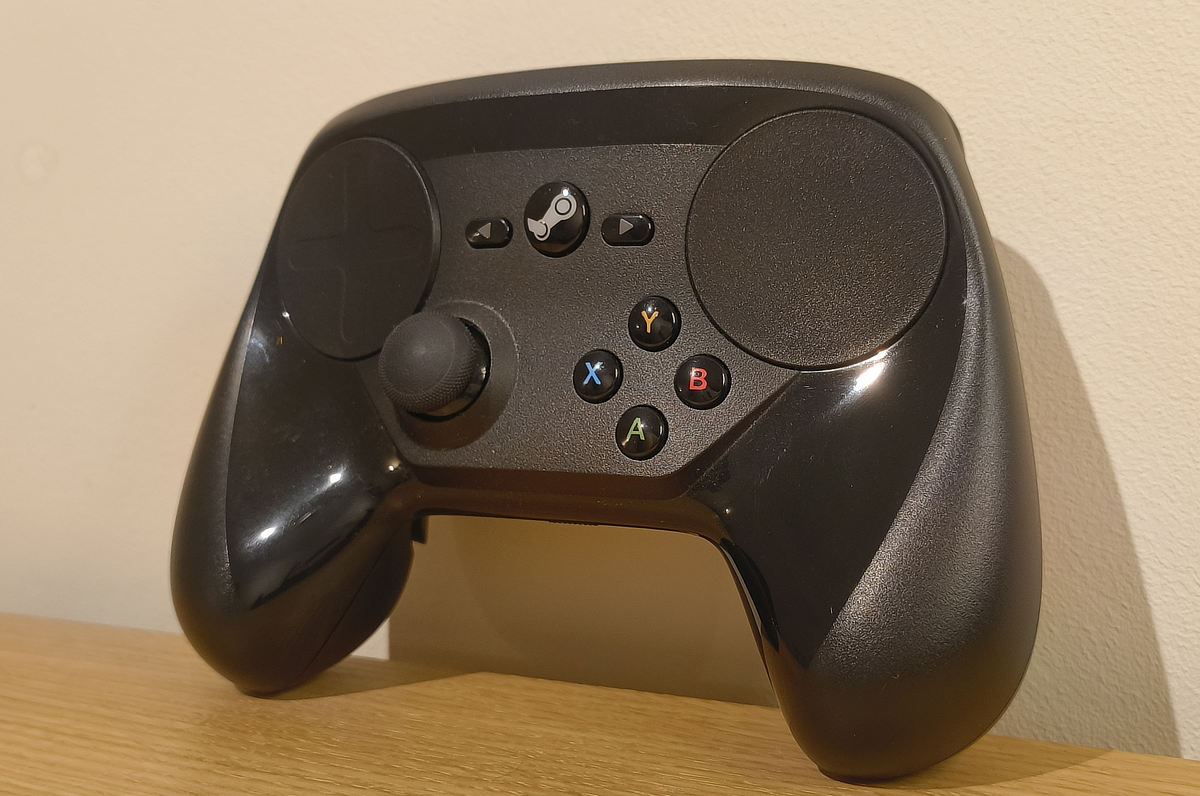
Looking at the features, you’ve got two ruddy big trackpads, a thumbstick, and it borrows the Xbox’s face buttons3. You’ve got your standard bumpers & triggers, on the back there are two paddle-like buttons (neatly tucked where your fingers rest), and inside of it is a gyroscope.
It can be connected to a computer via a MicroUSB cable, or if you want to use it wirelessly, you can pop 2 AA batteries in the back and plug its wireless USB dongle into your computer.
For a controller intended for PC games, it looks freaky. Eschewing the traditional D-pad and right thumbstick in favour of the trackpads isn’t helping, and it’s much chunkier than its counterparts. With that in mind you’d expect it to be cumbersome; yet it’s an ergonomic dream. It’s surprisingly lightweight, and the inwards-curving handles perfectly fit my palms while leading my thumbs towards the trackpads. It’s a dream to hold.
What’s up with the trackpads?
There’s no avoiding this one, it’s the controller’s main feature. Not only does it open up the controller for full PC use, but it’s also wot makes it look funky as hell.
The issue with traditional thumbsticks is that they’re not a good replacement for a mouse; you can’t make the same immediate, precise movements with them. Valve knew this from the start and their early prototypes featured a mouse trackball for mouse aim – then later switched to trackpads as they were as easy to work with, and could do even more with software tweaks.
The trackpads themselves feel great. They’re big, responsive, and their inwards curved shape perfectly accommodate your thumbs. From the first minute of using this controller, using a trackpad as a mouse becomes second nature. And it’s not just mouse controls, you can set them to imitate thumbstick inputs, and also to navigate custom menus. More on that later!
Oh and I can’t forget, people have been able to make the trackpads play music via the haptic actuators, it’s crazy.
And gyro?
The other deviation from a bog-standard controller is the inclusion of a gyroscope and accelerometer sensors. Simply put, it tracks the tilt of the controller.
It’s niche, but it has its uses. From using it as a steering wheel, to controlling a plane’s yaw & roll, or emulating a mouse. Again, it feels natural.
I find myself using gyro controls the most in FPS games, working in tandem with a trackpad to control the mouse/screen - making large sweeping movements with a trackpad, and using the gyro for miniature aim adjustments. It helps if you set it up so gyro aim is only activated when you’re touching the trackpad.
Steam Input
While PC games widely support controllers nowadays, the same couldn’t always be said a decade back. So how could you have a controller for PC games when so many of them demanded a mouse and keyboard?
The answer is Steam Input, Valve’s own input API built for the Steam Controller. Briefly put, it allows you to assign keyboard and mouse inputs (and more!) to the controller, finally bridging the gap between PC controls and couch play. It’s what let me use the gyro and trackpads as a mouse in the video above!
It’s hard to write about Steam Input. Despite the simple explanation above, in reality it’s extremely dense. Not only can you assign keyboard/mouse controls, but you can also:
- Set the sensitivity & emulated friction of the trackpads
- Set the trackpads to work like thumbsticks
- Assign differing commands to the triggers based on a soft/full press
- Enable turbo mode for any button
- Assign extra commands for a single press, double press, holding/releasing a button
- Change the entire controller config & layout by pressing or holding a button
That’s not an exhaustive list. There’s so much you can do with Steam Input. It quickly become complex depending on how many commands a game might require, as well as figuring out what feels right for you.
PC gaming is known for having extensive options & configs, and the Steam Controller at home here - while it’s great for tailoring experiences, the sheer amount of options gets in the way of simply playing. But Valve had that covered…
Sharable controller layouts
If you’re not in the mood to thoroughly set up your controller config, good news: you can borrow someone else’s. Steam Input lets you effortlessly switch between:
- Templates - Generic layouts for basic use. Use the trackpads as joysticks, use a track pad as a mouse, etc
- Developer layouts - Depending on the game, developers might have created a controller layout perfectly tailored for their game
- Community layouts - Other users with the controller can share their own layouts, and the wider community can vote on whether or not it’s good
It’s a simple way to beat the hassle. Though of course, if these layouts aren’t perfect, you’re still free to tweak them yourself!
Desktop mode
Ever wanted to use a computer with a controller? Steam Input lets you do that! It’s sounds weird, but a controller designed for PC games might as well be designed for PC use, and the options available in Steam Input make it a fully realised experience.
Set one trackpad for scrolling, another for mouse movement, set up buttons for left/right click and to bring up the virtual keyboard, and you’re golden. It’s hard to explain how smooth it feels using a controller to use my PC, but it’s great. It’s to the point where I’ve edited videos from the comfort of my bed solely by using this controller, that’s how good it is!
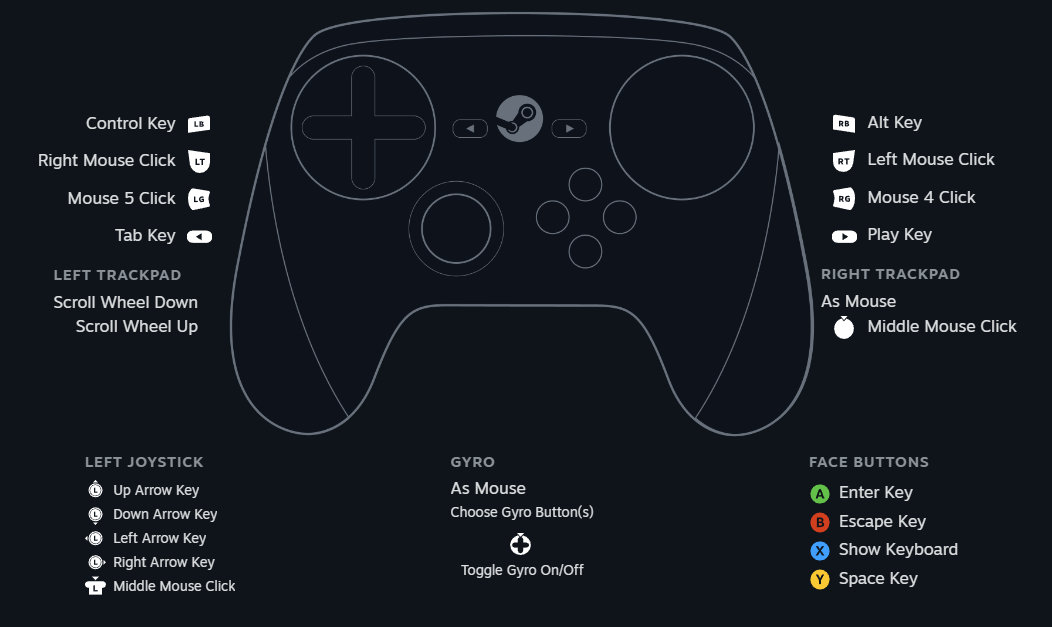
It’s worth mentioning that while Desktop mode is available for all compatible controllers, the Steam Controller was the first to have this feature – and with its massive trackpads being perfect for mouse control, it’s still the best controller for it out there!
Wot I think
It’s hard to sum my thoughts on the Steam Controller. When I mentioned dusting it off in the beginning of this blog post, I meant it quite literally. As much as I’ve gushed over it, it’s my least used controller for a simple reason: the lack of a directional pad and right thumbstick. It’s these omissions which hurt the controller the most.
For controller-based games the lack of core inputs hurts. It’s possible to make up for them with the trackpads, but it’s an uphill struggle. While the left thumbpad features a debossed D-pad design, it’s uncomfortable to use as such, requiring distinct thumbtip presses (rather than rolling the middle of your thumb over it). And using the right trackpad as the right thumbstick doesn’t always feel right – for twin-stick shooters it’s great, but in 3D platformers I just can’t use it to move the camera.
And for PC games… There’s an issue of compressing the whole gamut of controls into a few buttons. Something’s got to give, either you tuck them away in arcane button combinations switches, or omit them altogether – which leads to the following problem:
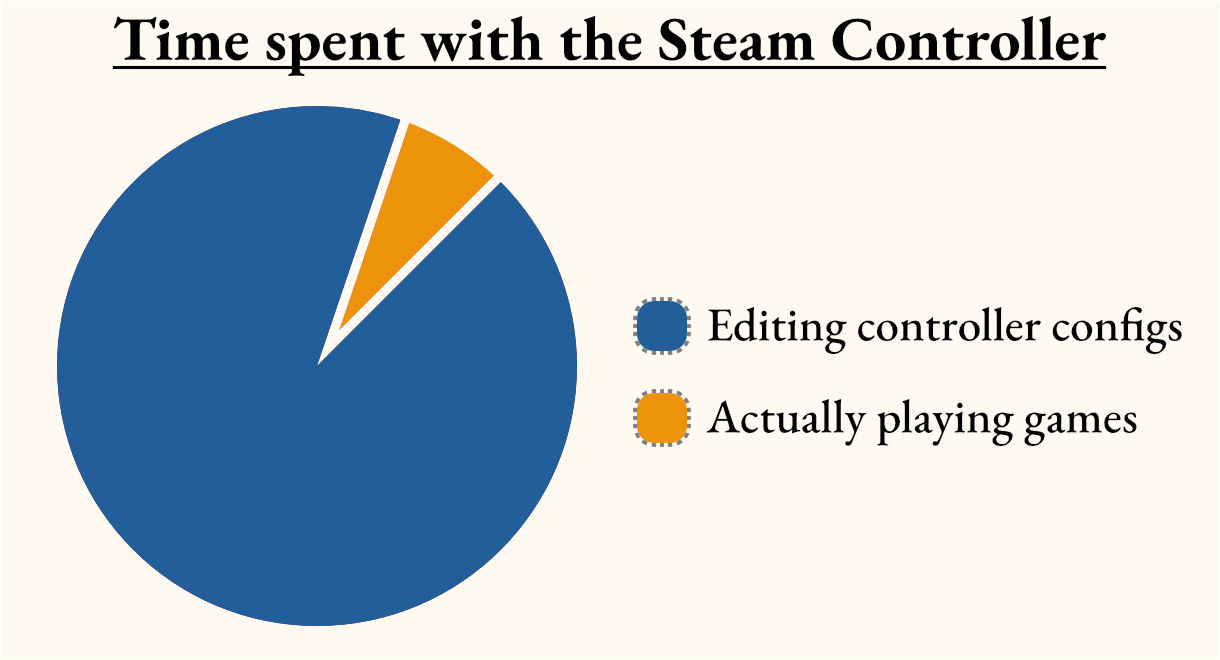
It wouldn’t be so bad, but ‘good enough’ doesn’t cut it when wrangling with this controller. Add on the insane amount of minute tweaks you can make in Steam Input, and you find yourself modifying every facet of the controller for hours on end.
I also have some minor ergonomic issues with the controller, but YMMV. With the large trackpads, my thumb has to travel a bit between the right pad and the face buttons, and my thumb often slipping the edge of the pad when changing position. Also the shape of the trigger and bumpers force me to hold both with my index and middle fingers – whereas on other controllers, I can swap between them with my index fingers just fine. It’s not a dealbreaker, but it’s awkward to adapt to.
While I think the Steam Controller succeeds in bridging PC gaming and couch play, it’s not perfect. It makes games playable, but there’s frequent compromise. I find it works best in games which heavily require a mouse, or FPS games with minimal controls/mechanics – Half-Life 2, Left 4 Dead, Quake, Deep Rock Galactic, etc.
Despite my misgivings, it’s still a nice controller. When you’ve finally perfected your custom layouts, it feels amazing to use… It’s just that for most games, ultimately I’d rather use my keyboard & mouse, or a bog-standard controller.
There’s still one thing I love it for: Desktop mode.
While I was writing this, I had to send my laptop off for repairs. Stuck with my Desktop PC to do everything with, I soon found myself dealing with wrist strain from constantly using my mouse. Being able to connect my controller and use it to navigate my PC seamlessly has been a lifesaver for when I needed to rest my arm – and while I could do it with any controller, the Steam Controller with its responsive trackpads have been perfect for the job.
I think that’s where I’ve used it the most in the decade or so of owning it, as some sort of accessibility tool when my arms need to rest. Although admittedly I’d still recommend using a physical keyboard – using Steam’s virtual keyboard with the trackpads works, but it’s nowhere near as quick as a real thing.
Would I recommend it?
It depends.
If you collect esoteric gaming peripherals, why not? Weird internet musician who wants to use the trackpad motors as an instrument? Go wild. Someone who wants it to consistently play video games with? Maybe hold off.
As Steam Input has matured and expanded to support other devices and add unique ways to map mouse input to thumbsticks, you’re better off using a standard controller. Currently I’d recommend Sony’s Dualsense controller, which features a touchpad and gyro controls.
The Steam Controller is nice, but its unfortunate flaws get in the way of consistent use. It’s the sort of controller you pick up and mess about with for a week before returning to something more conventional. You might find yourself repeatedly using it for a single game that fits its niche, but that’s about it.
If you can tailor your tastes to games with minimal controls, or mouse-heavy strategy games, I’m sure you can find a use for it.
I must also note a sort of… Cheap plastic feel to this controller? It rattles with movement, and it feels thin and fragile; like its a single fall away from completely breaking. I wouldn’t hold it against the controller myself, but I know others who mark points off because of it.
Also considering that it’s been out of production since the end of 2019, you’re going to have to rely on buying second-hand. God help you if something inside breaks, and there’s also no guarantee about how long the controller will be supported in the years to come – if Valve get fed up of supporting it or simply go bust, you might be out of luck.
Still, if you don’t mind dropping £40 on a novelty, I’m sure you can enjoy it. But there are better things to come…
Looking to the future
Like everything else at Valve, the Steam Controller was an experiment. It might not have stuck the landing, but by going all-in, it helped them mature and figure out where to go next.
Still wanting PC gaming to flourish away from the desk, Valve released the Steam Deck in 2022, and it took the world by storm. And from the get-go, you can see what they learned from the Steam Controller.
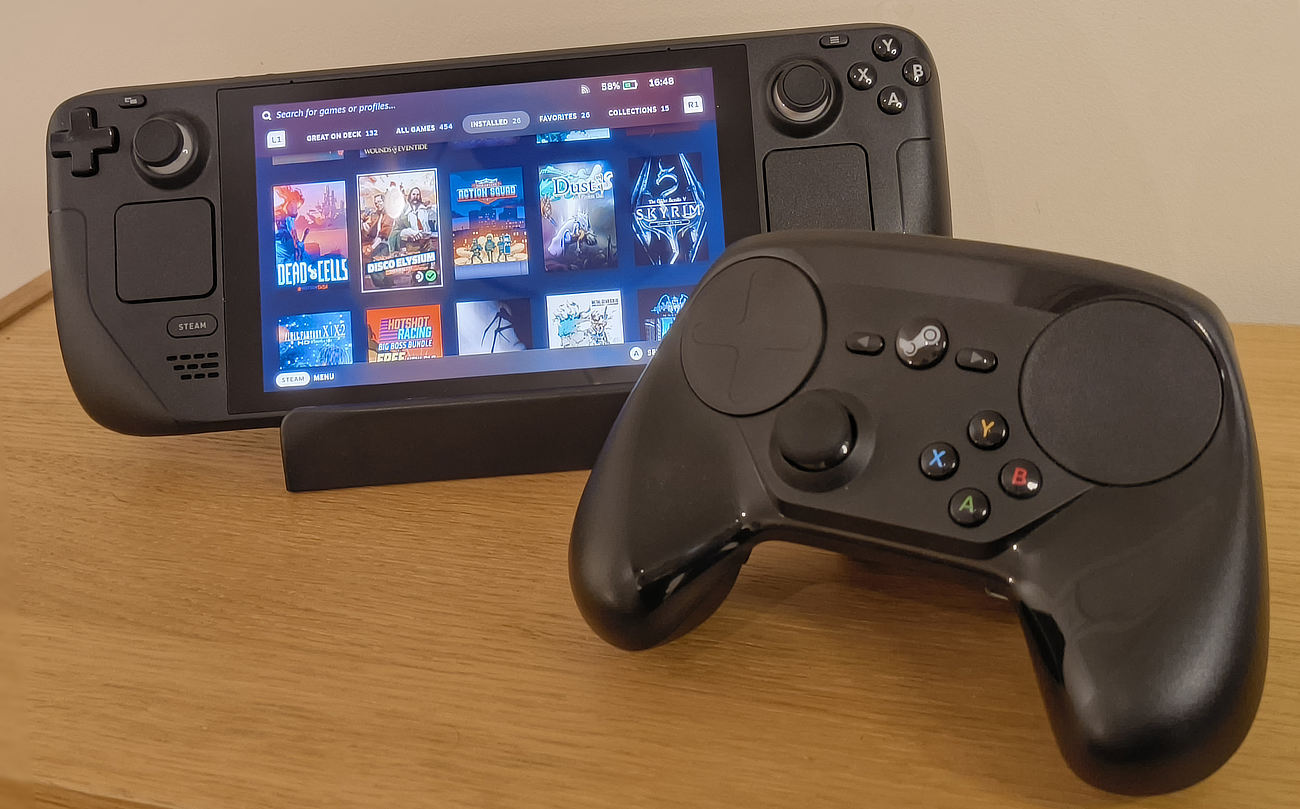
The trackpads are still around, albeit smaller to fit everything else in. The missing thumbstick and D-pad have returned, and this time around there are four extra buttons on the back. The thumbsticks are also capacitive, allowing you to do things like enable the gyro just by touching the sticks. And much like the controller, it has its own sharable controller layouts!
The Steam Deck is amazing. Not only can it run most PC games, but the full range of inputs make it truly uncompromising – regardless of if a game is designed for a controller or keyboard. Ultimately the Steam Deck has proved you can have the full PC gaming experience with a controller, and that brings us to…
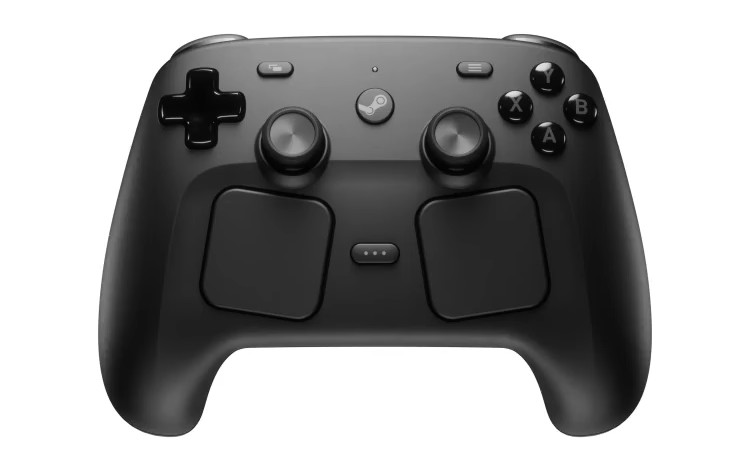
The upcoming Steam Controller shows a lot of promise, frankly because it’s got all the input gizmos of the Deck except the touchscreen and microphone. As an added bonus there’s also capacitive grips on the side which’ll be perfect for toggling gyro controls. And while it looks just as unwieldy as the first controller, I’m certain they’ve iterated a ton on the ergonomics. In the previews we’ve seen of it, the shape of the controller isn’t a problem whatsoever.
One thing I haven’t seen mentioned is that considering the sheer popularity of the Steam Deck, its amount of quality community controller layouts, and the fact the upcoming controller shares input parity with the Deck… We ought to be able to use all the Deck control layouts with the new controller, which’ll help a lot with both adoption and plug-and-play!
Of all the upcoming hardware Valve announced, it’s the new controller I’m the most excited for. Full uncompromised PC gaming in the palms of my hands? Sign me up!
The new Steam Machine might be a portable PC that pulls no punches, and the Steam Frame might be a VR headset that also plays non-VR games, but the controller simply has everything I’d need… And will be the most affordable of the bunch!
Unfortunately for the time being, my excitement is tempered. It seems that with the compatibility between all their upcoming devices, Valve wanted to release them all at the same time. In November 2025 this wasn’t a problem, but as the months have gone on RAMaggeddon has hit the world in full swing, sending RAM & storage costs skyrocketing as AI companies hoover up as much as they can.
Valve had plans to announce the price of the new hardware by now, but the state of the market has forced them to reconsider. While they say they still plan on releasing everything in the first half of the year, it’s easy to see a world in which it’s delayed further. In the weeks since then, Valve have had issues with Steam Deck stock over the memory & storage shortages.
When I initially started writing this blog post, I was excited for the near future. It’s just a shame that the state of AI hype has put a damper on everything else.
-
I started writing this 3 days after the reveal. Oops. ↩︎
-
Ultimately the Steam Machines failed. From the lack of Linux-supported games at the time, to the differing hardware specs between manufacturers, and the simple fact that PC gamers didn’t want to buy a second PC. ↩︎
-
Modern Windows natively supports Xbox controllers. Due to this, Xbox controllers became the most used & supported controllers on PC, leading to their ABXY button layout becoming dominant. ↩︎